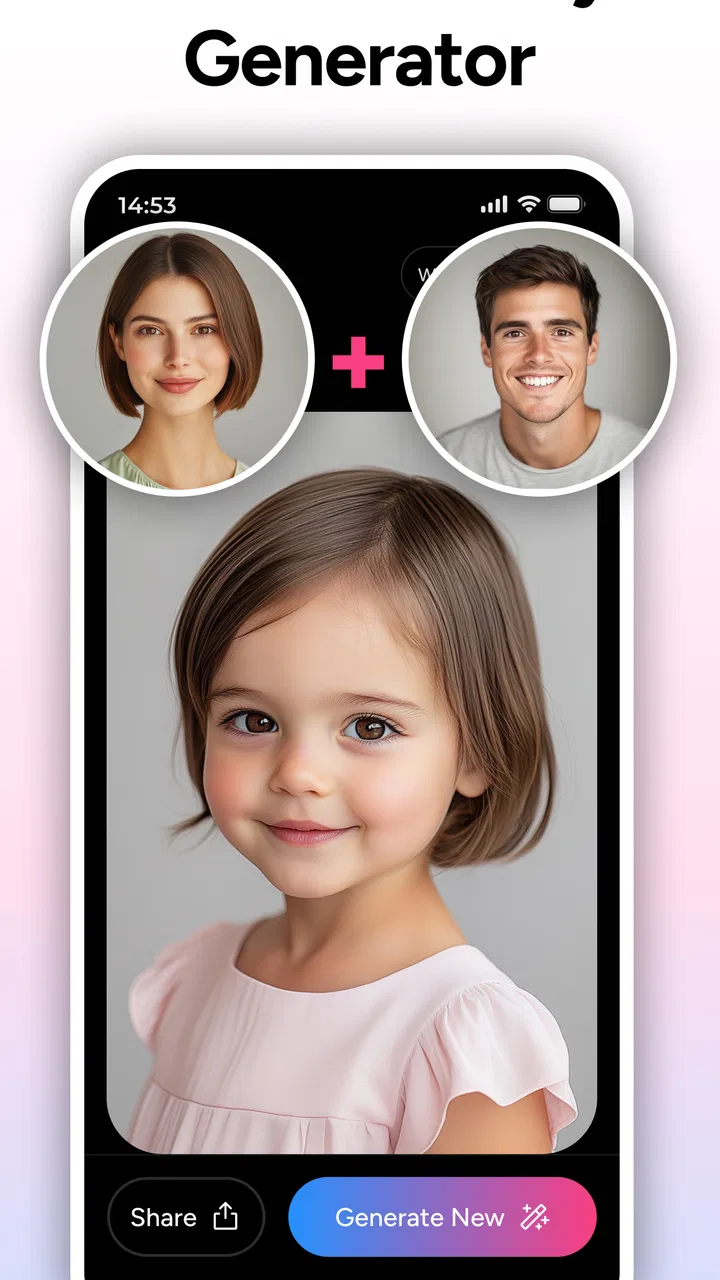
AI Baby Generator - TinyFaces
- 4.4
- Rating
- 100.00K
- Installs
- Free
- Price

 Analysis by App-foxy
AI Baby Generator - TinyFaces is the kind of parenting app I would open out of curiosity rather than necessity. Its central idea is simple: use artificial intelligence to create an imagined picture of what a future baby might look like. That makes it a light, shareable experience for couples, relatives, or anyone who enjoys playful image experiments, but it is important to approach it as entertainment rather than a meaningful prediction.
I spent time looking at how the app fits into everyday use, especially around personal photos and user control. The attraction is immediate, yet the real question is not only whether the generated face looks convincing. It is also whether you feel comfortable choosing photos, handling the result, and deciding what to do with an image that may involve very personal family information. My overall impression is positive for casual experimentation, with a cautious approach recommended whenever children’s or family members’ photos are involved.
What the app is really for
The app belongs to the parenting category, although it is closer to a playful visual tool than to a parenting guide. Its store summary asks what a baby might look like, while the short description presents it as an AI baby generator. In practical terms, I see it as a conversation starter: you select suitable photos, let the app create an imagined result, and then decide whether the picture is amusing, surprising, or simply a novelty.
You May Also Like

 Blood Strike: 2.5 Anniversary
Blood Strike’s Loadouts Turn Every Drop Into a Tactical Gamble
A close look at Blood Strike’s custom loadouts: how fast access to signature weapons reshapes its battle royale rhythm, rewards preparation, and narrows the gap between fights.

 Pandora - Music & Podcasts
Pandora’s Music Is Easy to Start, but Harder to Recover
Pandora’s strength is its low-effort path from a seed to a station. Its weak spot is how much confidence it asks you to place in connection, setup, and quiet recovery.

 8 Ball Pool
 Is Built on Rivalries, Rematches, and Routine
A close look at the rivalries, rematches, shared routines, and unanswered safety questions that turn a quick pool match into a persistent mobile community.

 Samsung Music
’s Quiet Strength Is Playing What You Already Own
Its reach comes less from spectacle than from dependable access to a personal library. That simplicity is both the app’s strongest retention engine and its ceiling.

 AccuWeather: Weather Radar
AccuWeather Review: A Quick, Clear Forecast for Everyday Decisions
For everyday plans, the best forecast is the one you can understand quickly. AccuWeather makes rain timing, radar, and local conditions easy to act on, with a few trade-offs.

 Hill Climb Racing
Why Hill Climb Racing Still Turns Crashes Into One More Run
A tiny car, a bumpy hill and one more upgrade: Hill Climb Racing keeps resurfacing because its simple chaos makes every near-miss feel personal.
More From Our News Desk



That distinction matters because an AI-generated baby face should not be read as a genetic forecast. Facial appearance depends on many factors, and an image produced from two photographs cannot establish what a real child would look like. I would not use the result to make family decisions, judge resemblance, or attach expectations to a future child. The healthiest way to use it is to enjoy the visual idea while keeping the result firmly in the category of fiction.
The app is free to install, which lowers the barrier to trying it. It also includes optional purchases ranging from $3.99 to $54.99 per item, so I would pay attention before confirming anything beyond the basic experience. A free download does not automatically mean every result or option is free. If I were handing the phone to a child or using it around relatives, I would check the purchase settings first rather than assume there is no spending risk.
First impressions and the role of HEYOS
HEYOS is the developer behind the app. It has reached over 100,000 installs and holds a 4.4 average from around 5,900 ratings, which suggests that plenty of people find the concept enjoyable. Those figures tell me the app has attracted a real audience, but they do not replace my own judgment about privacy, image handling, or whether the results feel worth the time.
The app was released in March 2022 and the current version is 5.2.2. It runs on Android 8.0 or later, making it accessible on many older phones as well as newer devices. I appreciate that broad compatibility because photo-based tools are often tested on recent hardware, while families may still share an older phone. Even so, the experience can depend on the quality of the selected pictures and the phone’s general performance.
Its Everyone age rating makes the concept approachable for a wide audience, but I would not interpret that as a reason to let young children use it without supervision. The content may be harmless, yet the important decisions concern uploading or selecting photographs, viewing generated faces, and potentially encountering purchase prompts. A parent can enjoy the app with a child while keeping control of the device and the images.
Trust, controls, and making careful choices
I treat photo choices and purchase controls as part of the experience, not chores to rush through. Before trying a new result, I decide who is comfortable being included and keep the session limited to pictures I actually intend to use. That deliberate approach makes the playful side easier to enjoy, while also helping me judge whether the app’s available choices feel comfortable enough for repeat use.
Why photo choice deserves more thought than it seems
The most overlooked part of this type of app is the starting material. A quick experiment can involve photographs of two adults, a partner who is not present, or relatives who never agreed to have their faces used in an AI image tool. I would choose ordinary, low-context portraits rather than pictures containing school uniforms, house numbers, documents, location clues, or other people in the background.
That is a practical privacy habit, not a claim about how TinyFaces handles images. The important point is that I should make a deliberate choice before selecting a photo. Cropping can reduce unnecessary background information, and using copies rather than original camera files helps avoid accidentally sharing a larger personal photo collection. I would also avoid choosing an image that includes a child unless the responsible parent or guardian is comfortable with that decision.
A useful workflow is to create a temporary album containing only the two images intended for the experiment. Afterward, I can remove the copies if I no longer need them. This keeps the process separate from my main camera roll and makes it easier to remember which pictures were used. It is a small step, but it gives me more control than browsing through the entire gallery while distracted by the novelty of the result.
What I would check before confirming anything
When an app uses personal photos, I look for visible choices at the moment I select an image. I want to know which photo is being used, whether I can replace it, and whether I can back out before starting the generation. If the screen presents a purchase or another confirmation, I read it instead of tapping quickly. These are the points where user agency matters most.
I would also review the app’s available privacy information and device settings before using it regularly. I am not going to treat a polished interface as proof of a particular data practice, and I would not assume that an AI image tool works only on the phone. The safest position is to rely on the permissions, notices, and choices actually shown to me, not on guesses about what happens behind the scenes.
If the app requests access broader than I expect, I would pause and consider whether the feature genuinely needs it. Selecting individual photos, when that option is available on the device, is preferable to granting access to an entire library. I would also revisit permissions later through Android settings rather than assuming the first decision is permanent. This is especially sensible on a shared family phone.
Where the free model can create friction
The free installation is appealing, but optional purchases change how I would test the app. I would first explore the visible flow without rushing toward an upgrade, then decide whether the result is entertaining enough to justify spending. A generated face is inherently subjective: one person may find it delightful, while another may see a generic or unconvincing image. That makes it difficult to know in advance whether a paid option will feel worthwhile.
I would enable purchase authentication on the relevant app store and avoid leaving the device unlocked during a family gathering. That advice is particularly important because an Everyone-rated app may be used by children who understand the fun of the feature but not the financial consequence of tapping a confirmation button. The app can be a shared activity without giving everyone unrestricted control over purchases.
Another useful habit is to save only the result I actually want. Generating multiple versions can encourage endless comparison, but more images do not make the prediction more accurate. If I am using the app for a joke or a conversation, one or two results are usually enough. Limiting the session reduces clutter and keeps the experience from turning into an unplanned spending loop.
Everyday scenarios where it works well
I can imagine using TinyFaces during a relaxed evening when two adults are curious about a possible family resemblance. Each person chooses a clear portrait, checks that no unrelated faces appear in the frame, and treats the generated image as a playful prompt for conversation. The best part is often not the picture itself but the discussion about whose eyes, smile, or hair seems to have appeared.
It can also work as a harmless activity at a family gathering, provided the people in the photos agree and one adult manages the device. I would show the result on the phone rather than automatically sharing it everywhere. That keeps the moment private and avoids turning a temporary joke into a permanent social post.
For a couple considering parenthood, the app may offer a fun way to talk about expectations without pretending to answer serious questions. I would use it after making clear that the image has no medical or predictive value. If someone is already anxious about appearance, inheritance, or pregnancy, I would skip the app; a random generated face could create more worry than enjoyment.
How it compares with ordinary alternatives
The usual alternative is simply looking at childhood photographs of the adults involved. That approach is slower and less flashy, but it is grounded in real family history rather than an algorithmic guess. I often find old photographs more meaningful because they invite genuine comparison without suggesting that a generated face carries special authority.
Another alternative is using a standard photo editor or collage tool. Those apps offer more control over cropping, captions, and presentation, but they do not provide the central AI transformation. If my goal is to make a keepsake or share a family announcement, an editor may be the better choice because I can control the final composition and avoid presenting an artificial face as if it were a forecast.
Image-generation services can offer broader creative possibilities, yet they may introduce more complicated settings and a wider range of outputs. TinyFaces is more focused and easier to understand: the appeal is the imagined baby result. That focus is its strength for a quick experiment, but also its limitation for anyone wanting detailed editing, reliable resemblance, or an educational parenting resource.
Who should use it, and who should pass
I think it suits adults who understand the playful premise and are willing to make careful choices about photos. It is also a reasonable fit for families looking for a short conversation activity, as long as an adult handles permissions and purchases. People who enjoy comparing AI images, discussing family traits, or sharing a private laugh will probably get the most from it.
I would skip it if I needed dependable information about genetics, pregnancy, child development, or health. The parenting label should not lead anyone to expect expert guidance in those areas. I would also avoid it if I felt uncomfortable selecting personal faces for an AI-based process, or if the app’s visible choices did not give me enough confidence at the point of use.
It is not the right tool for creating a serious family record either. The output is better treated as temporary entertainment than as a meaningful representation of a future child. If I wanted a thoughtful keepsake, I would choose real photos, a family story, or a carefully designed collage instead.
My cautious verdict after using the concept in practice
The strongest reason to try TinyFaces is curiosity, not prediction. The app delivers a focused form of AI entertainment that can be amusing in the right setting, and its free entry makes a brief experiment easy. Its broad device support and Everyone rating also make it approachable for family use, although neither removes the need for adult supervision.
My recommendation comes with a clear routine: use photos deliberately, crop away unnecessary details, involve the people whose faces are selected, review visible permissions and notices, and protect purchases with authentication. I would save only the images I genuinely want and remove temporary copies afterward. These steps do not make assumptions about the developer’s practices; they simply give me more control over my own side of the interaction.
The app’s 4.4 average and sizeable audience show that the idea resonates, but enjoyment will depend heavily on personal expectations. Someone looking for a magical glimpse of a real future baby may be disappointed. Someone looking for a quick, imaginative experiment may have a good time, especially when the result becomes a topic for conversation rather than an answer.
In the end, I would recommend AI Baby Generator - TinyFaces to curious adults who can keep the experience light and manage their photos carefully. I would not recommend treating it as a parenting authority or using it when the generated result could affect someone’s emotions. Used with that boundary, it is a pleasant novelty; used as evidence, it becomes far more than the app can responsibly provide.
FAQs for AI Baby Generator - TinyFaces
01What is AI Baby Generator - TinyFaces, and how does it work?
AI Baby Generator - TinyFaces is an entertainment app that uses artificial intelligence to create imagined baby-face images from uploaded photos. After selecting suitable pictures, the app processes facial features and produces a generated result intended for fun and visual experimentation. The outcome is not a scientific prediction of what a future child would look like, but an AI-created interpretation that can vary considerably between attempts.
02Is AI Baby Generator - TinyFaces free to download and use?
The app may be available to download at no initial cost, but some features, image generations, filters, or higher-quality results can be restricted by in-app purchases or a subscription. Before confirming payment, users should carefully review the pricing screen, trial terms, renewal conditions, and cancellation instructions shown in the app store. Availability and prices may also differ between Android and iOS.
03What kind of photos should I upload for the best results?
For more consistent results, use clear, front-facing photos with good lighting and only one visible face in each image. Avoid sunglasses, heavy filters, extreme angles, blurred pictures, or faces partly covered by hair and accessories. Even with suitable photos, generated results are unpredictable because the app interprets images algorithmically rather than performing a genuine genetic analysis.
04Does AI Baby Generator - TinyFaces protect uploaded photos and personal data?
Before uploading personal or family photos, review the app’s privacy policy and the permissions requested on your device. Check whether images are processed locally or sent to remote servers, how long they may be retained, and whether they can be used to improve AI systems or shared with service providers. Avoid uploading photos of children or other people without appropriate consent.
05Can the generated baby image be saved or shared on social media?
After generation, the app may provide options to save an image to your device or share it through messaging and social media applications. Export options, resolution, watermarks, and sharing features can depend on the selected plan or the current version of the app. Remember that these images are fictional AI creations, so label them clearly when sharing to avoid misleading friends or family.
Pros
- Creates playful baby-face predictions from uploaded photos.
- Simple interface makes it easy to generate results quickly.
- Offers entertaining results for sharing with friends and family.
- Supports experimenting with different photos and combinations.
- Useful for casual amusement without requiring creative skills.
Cons
- Results are artistic predictions
- not accurate representations of future children.
- Photo uploads may raise privacy concerns depending on storage policies.
- Some features or generations may require in-app purchases.
- Output quality can vary significantly with lighting and photo clarity.
- Frequent ads may interrupt the experience for free users.

AI Baby Generator - TinyFaces
Gallery